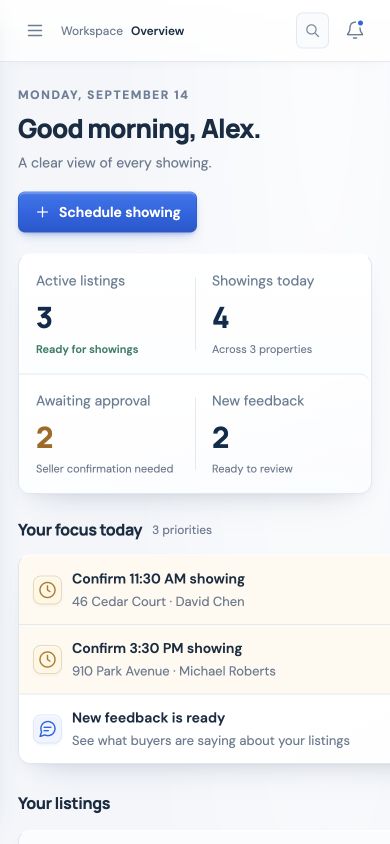
Your doorbell for showings.

Stop being the middleman for every showing request.

Showing Bell gives listing agents a simple scheduling link for every listing, so buyer’s agents can request showings online and sellers can approve, decline, or request a different time by text and email.

  • You stay informed.
  • Your seller stays in control.
  • The buyer’s agent gets an answer faster.
  • Built by listing agents
  • Not owned by Zillow
  • $25 per listing, active up to 6 months
  • Homes, land, commercial, and more
The old way

The old way is showing tag.

Every listing agent knows this routine. A buyer’s agent wants to show the property, so they call or text you. Then you call or text the seller. Then the seller checks the time. Then you call or text the buyer’s agent back. If the time does not work, you start the whole process over again.

That is not showing management. That is showing tag.

Too many calls and texts

Showing requests get buried in scattered text threads, missed calls, and follow-up messages.

Sellers are waiting

Sellers want to know what is happening without waiting for you to relay every update.

Buyer’s agents need faster answers

A simple showing request should not take multiple people and multiple messages to coordinate.

Feedback gets lost

After the showing, agents are often left chasing feedback that never comes back.

Vacant listings go untracked

Easy access does not mean you should lose insight into who showed it and what they thought.

Showing Bell was built to fix the part of listing management that should not still be this clunky.

The solution

One link. One request. One smoother showing process.

With Showing Bell, each listing gets its own scheduling link. Place it in the MLS, showing instructions, agent remarks, property website, email, or wherever buyer’s agents need access. When a buyer’s agent requests a showing, the seller receives the request directly by text and email. They can approve, decline, or request a different time. You are no longer forced to relay every message manually — but you still stay informed every step of the way.

Scheduling links for every listing

Create a unique Showing Bell link for each property and place it directly in your MLS showing instructions.

Seller text and email approval

Showing requests go directly to the seller so they can respond quickly — no app, no portal login.

Agent notifications

You stay updated without having to manually coordinate every showing.

Built-in feedback loop

After the showing, buyer’s agents are prompted for feedback so you can better advise your seller.

How it works

How Showing Bell works

  1. 1

    Add your listing

    Add the property inside your Showing Bell agent portal.

  2. 2

    Create your scheduling link

    Showing Bell creates a simple scheduling link for that listing.

  3. 3

    Put the link in the MLS

    Add the link to your MLS showing instructions, agent remarks, or wherever your MLS allows showing links.

  4. 4

    Buyer’s agent requests a showing

    The buyer’s agent clicks the link and requests a showing time.

  5. 5

    Seller confirms directly

    The seller receives the request by text and email and can approve, decline, or request a reschedule.

  6. 6

    Feedback comes back automatically

    After the showing, the buyer’s agent receives a feedback request so you and your seller get better insight.

Less chasing. Faster approvals. Better feedback.

Why Showing Bell

Built by listing agents, for listing agents.

Showing Bell was not built by a massive portal company trying to control the real estate transaction. It was built by agents who actually manage listings, work with sellers, chase feedback, and understand how much time gets wasted on simple showing coordination.

We built Showing Bell because listing agents needed something simpler, faster, and more seller-friendly.

  • Built for real listing workflows
  • Designed to keep agents in control
  • Simple enough for any seller to use
  • Fast enough for busy buyer’s agents
  • Flexible enough for different property types
  • Independent from Zillow
Alternative

A simpler alternative to ShowingTime.

ShowingTime is a large showing management ecosystem. Showing Bell is different.

Showing Bell is built for listing agents who want a clean, simple, per-listing showing tool without needing a brokerage-wide rollout, an MLS contract, or a portal-owned platform.

We are not owned by Zillow. We are not trying to become the middleman between you and your clients. We help you manage showing requests, seller approvals, and feedback — then we get out of the way.

Your listing. Your seller. Your data. Your process.

Vacant listings

Vacant does not mean invisible.

A vacant listing may be easy to access, but that does not mean it should be unmanaged. When agents let vacant listings be shown without scheduling, they lose valuable listing intelligence.

Your seller does not just need access. They need insight.

Property types

Not just for houses.

Showing Bell works for any property where access, activity, and feedback matter.

Residential homes
Vacant homes
Land and lots
Commercial properties
New construction
Investment properties
Cabins and recreational
Development projects
Model homes
Rental portfolios

If someone needs to tour it, walk it, preview it, inspect it, or access it, Showing Bell can help you manage it.

Seller experience

Sellers love knowing what is happening.

Sellers do not want to feel left in the dark after they list their property. They want to know when showings are requested. They want a fast way to approve or request a different time. They want feedback. They want to feel like their agent has a professional system.

Showing Bell gives sellers a clear, simple showing experience through text and email.

  • No app download required
  • No confusing portal login
  • No waiting for a chain of phone calls
Buyer agent experience

Buyer’s agents get answers faster.

Buyer’s agents are busy too. They do not want to chase down the listing agent just to find out whether they can show a property at 3:00. With Showing Bell, they click the scheduling link, request their showing time, and receive updates without all the unnecessary back-and-forth.

  1. 1Opens MLS link
  2. 2Requests a time
  3. 3Gets confirmation
  4. 4Shows the property
  5. 5Submits feedback

A smoother process for buyer’s agents creates a better experience for everyone.

Feedback

Stop chasing feedback after every showing.

Scheduling the showing is only half the job. After the showing, you need feedback. Showing Bell helps collect feedback from buyer’s agents so you and your seller can understand what is really happening in the market.

How did the showing go?
Is your buyer interested?
What did they like?
What concerns did they have?
Is price an issue?
Are they considering an offer?

Better feedback helps you advise your seller, adjust your strategy, and prove your value as the listing agent.

Pricing

Simple pricing. One flat fee.

No confusing plans. No monthly subscription. No brokerage contract. No paying for tools you do not need.

Showing Bell Listing
$25 per listing
Active for up to 6 months.
  • Scheduling link for your listing
  • Buyer agent showing requests
  • Seller text and email approval
  • Seller approve, decline, or reschedule
  • Buyer agent confirmations
  • Listing agent notifications
  • Showing activity history
  • Automated feedback requests
  • Feedback dashboard
  • Custom showing instructions
  • Homes, land, commercial, new construction, cabins, investment, and more
  • One $25 flat fee per listing
  • Active for up to 6 months
  • Valid for one specific listing
  • Not transferable to another property
  • No monthly subscription
  • No hidden upgrade tiers
Create Your First Showing Link

One listing. One flat fee. Everything included.

FAQ

Common questions

Is Showing Bell owned by Zillow?

No. Showing Bell is independent and built for listing agents. We are not owned by Zillow and we are not trying to become the middleman between you and your clients.

Is Showing Bell a ShowingTime replacement?

Showing Bell is a simpler showing management option for listing agents who want a per-listing tool for scheduling requests, seller approvals, and feedback. It is not trying to be a massive MLS-wide platform. It is built to be simple, affordable, and easy to use on your active listings.

Can I use Showing Bell on vacant listings?

Yes. In fact, vacant listings are a great use case. Even if access is easy, you still get showing history, buyer agent information, and feedback instead of letting activity happen without insight.

Does the seller need to download an app?

No. Sellers receive showing requests by text and email. The goal is to make the process simple and easy for sellers.

Where do I put the Showing Bell link?

You can place the Showing Bell scheduling link in the MLS showing instructions, agent remarks, private remarks, property website, email, or wherever your MLS and brokerage rules allow.

What types of properties does it work for?

Showing Bell works for residential homes, vacant homes, land, commercial properties, new construction, cabins, investment properties, development projects, and more.

How long does my listing stay active?

Each Showing Bell listing is active for up to 6 months, or until the listing is sold, expired, or canceled.

Can I transfer my purchase to another listing?

No. Each Showing Bell purchase is tied to one specific listing and is not transferable to another property.

What happens after a showing?

Showing Bell can send an automated feedback request to the buyer’s agent so you and your seller can better understand what happened during the showing.

How much does it cost?

Showing Bell is $25 per listing. Everything is included. No monthly subscription. No hidden upgrade tiers.

Ready to stop playing showing tag?

Create a Showing Bell link for your next listing and give your seller a smoother, faster, more professional showing experience.

Showing Bell helps listing agents manage showings without becoming the middleman for every request.